Check your latest FESCO electricity bill online using your 14-digit reference number.
Enter your reference number below to view or download your duplicate bill in seconds.
- Fast bill access
- No signup required
- Mobile-friendly bill checker
This is an independent informational website and is not officially affiliated with FESCO. Bills are retrieved securely from the official billing source. We do not store your bill information.
FESCO Online Bill Check 2026
Check your FESCO electricity bill online.
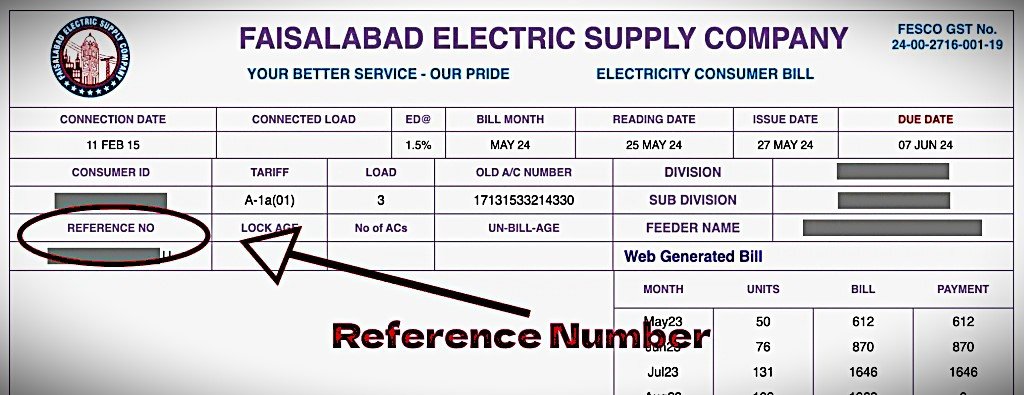
Find your reference number on your electricity bill or meter
Enter your consumed units to estimate your electricity bill based on NEPRA 2025 tariff rates.
Electricity Cost Saver Calculator
Estimate appliance electricity usage, monthly units, and potential savings.
Consumer Type
Appliance Inputs
Electricity Saving Tips for Lower Monthly Bills
Track appliance consumption awareness, reduce unnecessary usage hours, and optimize high-load devices to lower your electricity bill and improve long-term household energy efficiency.
Where to Find FESCO Reference Number?
Your 14-digit reference number is printed on the top left side of your electricity bill.
Use this number to check, download, or print your latest bill online.
Download Duplicate FESCO Bill
After checking your bill, you can:
- Download bill PDF
- Print duplicate copy
- Save bill for later use
- Check due date and payable amount
Make sure your reference number is entered correctly before checking the bill.
FESCO Bill Information
Here are some common details shown on a FESCO electricity bill:
| Bill Detail | Description |
|---|---|
| Reference Number | Unique bill identification number |
| Customer Name | Registered consumer name |
| Due Date | Last payment date |
| Billing Month | Current bill month |
| Units Consumed | Electricity usage |
| Peak Units | Peak hour consumption |
| Off-Peak Units | Normal hour usage |
| Arrears | Previous unpaid amount |
| Taxes | Government taxes included in the bill |
| Total Amount | Final payable amount |
How to Pay Your FESCO Bill
You can pay your electricity bill using:
- JazzCash
- Easypaisa
- Banking apps
- ATM machines
- Bank branches
Always pay your bill before the due date to avoid late payment charges.
FESCO Peak Hours
Electricity usage during peak hours may increase your bill amount.
| Season | Peak Hours |
| April to October | 6 PM – 10 PM |
| November to March | 5 PM – 9 PM |
Reducing electricity usage during peak hours can help lower your monthly bill.
Common FESCO Bill Problems
Bill Not Loading
Check your internet connection and make sure the reference number is correct.
Incorrect Reference Number
Your reference number must contain 14 digits.
Slow Bill Loading
Sometimes the official billing server may take longer to respond during busy hours.
Why Use This FESCO Bill Checker?
This page is designed to help users quickly access their latest electricity bill online without unnecessary steps.
Benefits:
- Simple and clean interface
- Fast bill access
- Easy mobile use
- Duplicate bill download
- Helpful bill information
FESCO Bill FAQs
How can I check my FESCO bill online?
Enter your 14-digit reference number in the bill checker above and click the button to view your latest bill.
Where can I find my reference number?
The reference number is printed on the top left side of your electricity bill.
Can I download a duplicate FESCO bill?
Yes, you can download or print a duplicate copy after opening your bill.
Is this an official FESCO website?
No. This is an independent informational website that helps users access the official billing source more easily.
Do you store bill information?
No. We do not store your bill details or reference number.
Need help? Contact FESCO support or call 118 (WAPDA Helpline)